
Clickwrap agreements show up across digital products wherever a user has to accept legal terms before continuing. The exact terms involved, and the way acceptance is presented, depend on the context. A clickwrap agreement example from a signup form rarely transfers cleanly to a checkout flow or a software installer, so creating an account, completing a purchase, installing software, and accepting an updated agreement each call for a different flow.
The examples below are organized by the point in the user journey where acceptance is typically required. Each one covers the type of flow, where the clickwrap appears, the agreements usually presented, and how acceptance is captured, so you can build the right clickwrap flow for each.
Clickwrap Agreement Examples by Use Case
Account Creation
Connects the new account to the platform's operating rules.
Account creation is the most common place a user encounters a clickwrap agreement. Before access is granted, the user must accept the service-level terms that will govern their account. SaaS platforms, software products, customer portals, and web applications all rely on this flow to tie registration to the platform's operating rules.
Where It Appears:
- Signup page
- Registration form
- Customer portal onboarding
- Account creation screen
Terms Commonly Accepted:
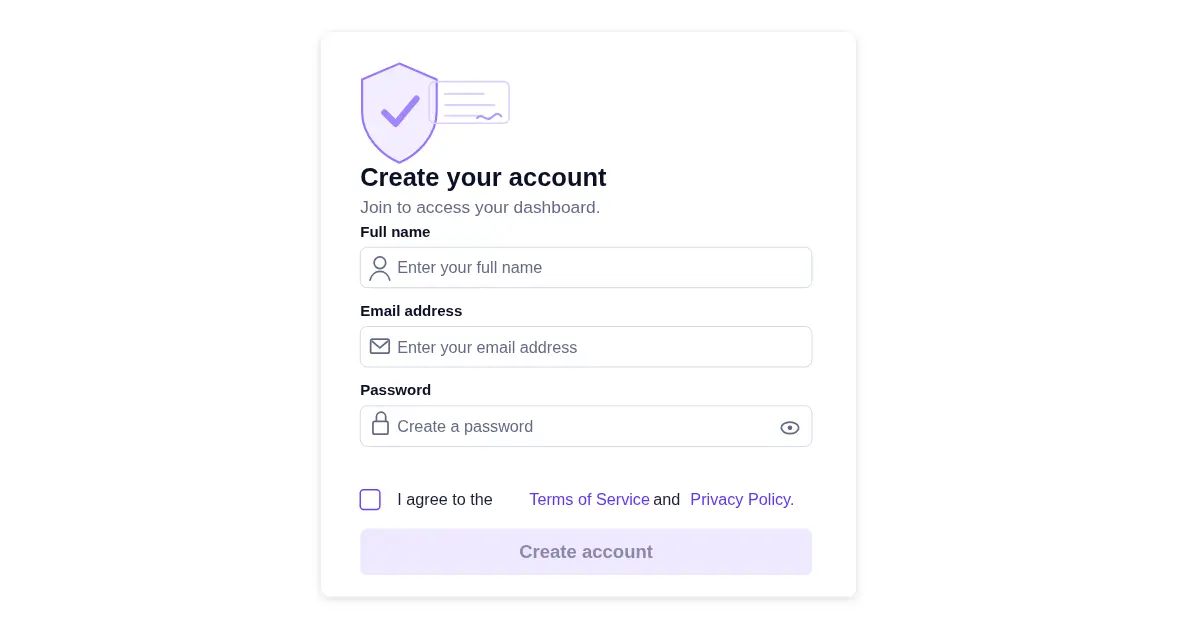
How Acceptance Is Captured: An unchecked checkbox below the registration fields, paired with inline language such as "I agree to the Terms of Service and Privacy Policy" where each document name is a separate hyperlink. The "Create Account" button stays disabled until the box is checked, and the acceptance event is logged server-side with the account record and the agreement version in effect at that moment.
What The Acceptance Covers:
- Account access
- User responsibilities
- Permitted and prohibited uses
- Data practices
- Intellectual property terms
- Service limitations
- Account suspension or termination rights
- Dispute-related provisions
The account-creation clickwrap ties the user's registration to the platform's operating rules, including how the account may be used, what conduct is restricted, when limitations apply, and under what conditions the business can suspend or terminate access.
Common pitfall: Bundling the Terms of Service and Privacy Policy into a single checkbox without distinguishing contractual acceptance from privacy disclosure. Over-bundling weakens the clarity of what the user agreed to, and in regimes like the GDPR, it can also undermine the validity of the privacy consent itself.
Subscription Signup
Locks in the commercial terms attached to paid access, including renewal and cancellation rules.
When a user signs up for paid access, clickwrap captures their acceptance of the commercial terms attached to that access, including recurring billing, renewals, cancellation rules, and plan limitations. This pattern appears across SaaS platforms, paid applications, membership products, and any digital service billed monthly or annually.
Where It Appears:
- Pricing page
- Payment page
- Free trial activation screen
- Plan upgrade flow
Terms Commonly Accepted:
- Subscription Terms
- Terms of Service
- Auto-Renewal Terms
- Cancellation Policy
- Refund Policy
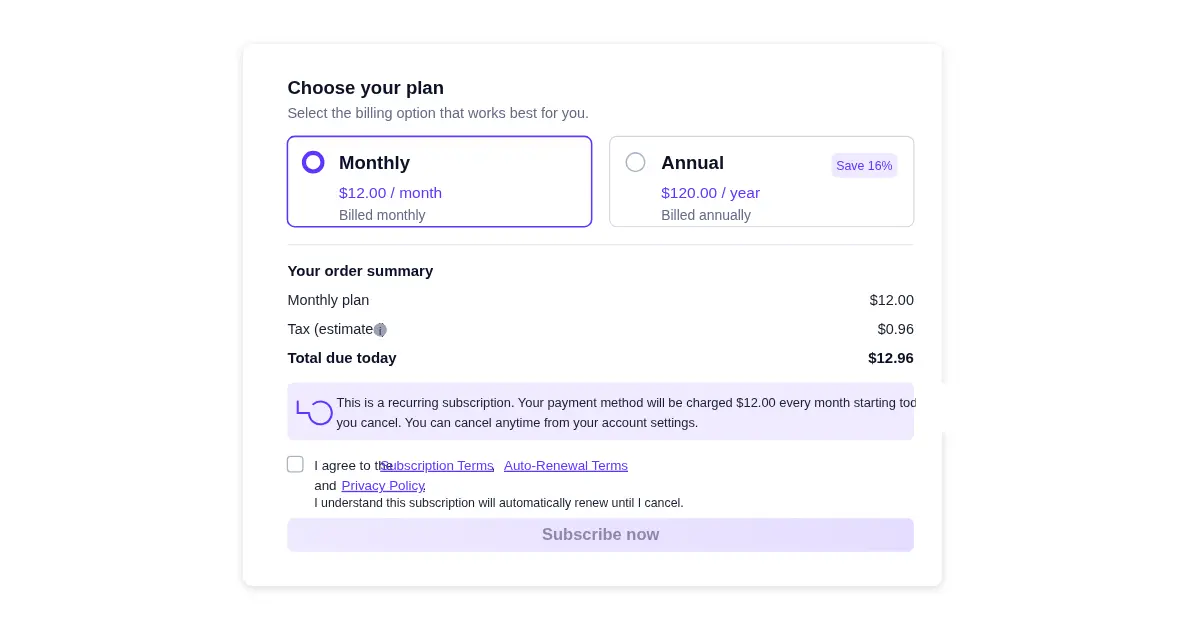
How Acceptance Is Captured: A dedicated acceptance checkbox or button on the payment screen, often paired with a visible auto-renewal disclosure adjacent to the price. The acceptance is recorded alongside the transaction ID, plan selection, billing cycle, and the version of the subscription terms shown at the moment of signup.
What The Acceptance Covers:
- Payment authorization
- Billing frequency
- Renewal terms
- Cancellation requirements
- Refund eligibility
- Trial conversion
- Usage limits
The subscription signup clickwrap matters most where the service renews automatically, a free trial converts to a paid plan, or cancellation and refund rights depend on the specific terms shown at signup. The acceptance event needs to be tied to those exact terms, not to a general Terms of Service that doesn't address billing directly.
Common pitfall: Burying auto-renewal terms in linked documents rather than disclosing them at the acceptance step. California's Automatic Renewal Law, the FTC's negative-option rules, and the EU Consumer Rights Directive all require auto-renewal terms to be disclosed clearly at the point of acceptance. Burying them in a linked document is, in several jurisdictions, enough on its own to make the renewal clause unenforceable.
Ecommerce Checkout
Attaches a specific order to the rules governing payment, fulfillment, and refunds.
At checkout, clickwrap ties the user's order submission to the rules governing the sale. Online stores, digital product sellers, marketplaces, and software vendors use this step to capture acceptance of purchase terms before payment is processed.
Where It Appears:
- Checkout page
- Order review screen
- Digital product purchase flow
Terms Commonly Accepted:
- Sales Agreement
- Refund Policy
- Return Policy
- Shipping Policy
- Warranty Terms
How Acceptance Is Captured: A checkbox or inline acknowledgment placed directly next to the "Place Order" button, with hyperlinks to each document the user is accepting. The acceptance is logged together with the order ID, item details, total amount, and the version of the terms of sale presented at that moment.
What The Acceptance Covers:
- Payment authorization
- Refund eligibility
- Return requirements
- Shipping conditions
- Cancellation limits
- Warranty coverage
- Dispute-related provisions
The checkout clickwrap binds the order submission to the rules governing payment, fulfillment, refunds, returns, cancellations, product access, and post-purchase obligations. It exists because completing payment alone doesn't communicate acceptance of those rules; the acceptance step does.
Common pitfall: Relying on the "Place Order" button itself as the acceptance action, without a distinct notice tying that click to the terms of sale. In Nguyen v. Barnes & Noble, the Ninth Circuit refused to enforce Barnes & Noble's terms because the user was never required to take a separate affirmative action to accept them. A conspicuous hyperlink near the checkout button wasn't enough on its own. A properly structured checkout clickwrap, with a distinct acceptance step, would have produced the opposite outcome.
Software Installation
Sets the license conditions before the product is installed or used.
Software installation flows use clickwrap to capture acceptance of license terms before the product is installed, activated, or used. Desktop applications, enterprise software, downloadable tools, and developer products distributed under an End User License Agreement all rely on this acceptance step.
Where It Appears:
- Installation wizard
- First-launch screen
- Software update flow
Terms Commonly Accepted:
- End User License Agreement
- Acceptable Use Policy
- Support terms
- Update terms
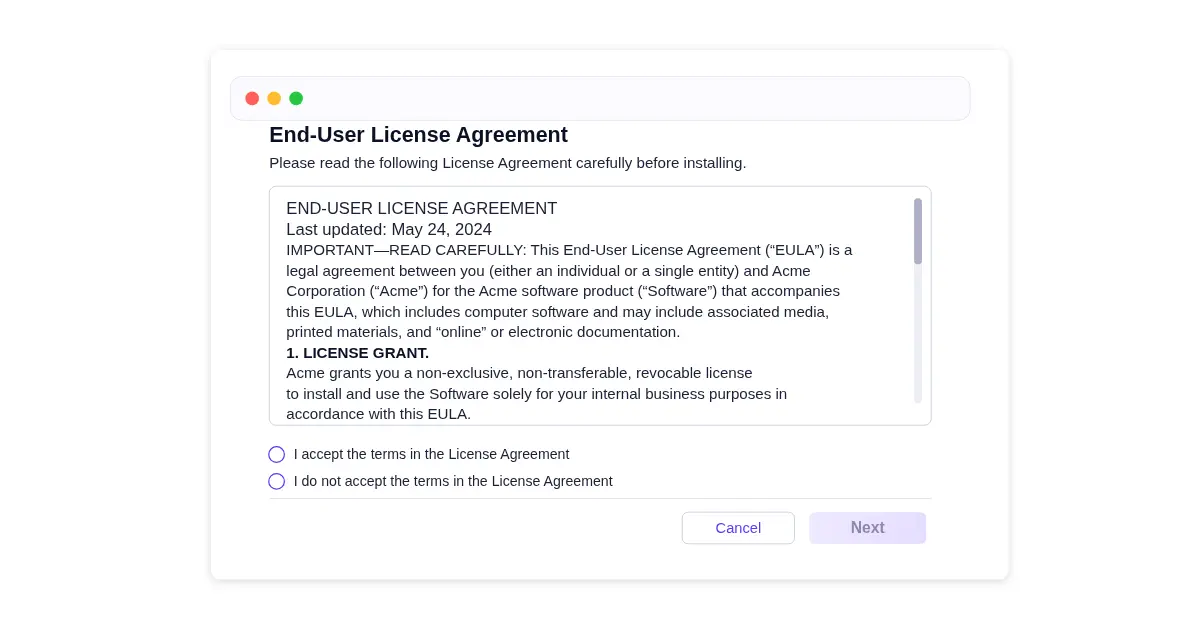
How Acceptance Is Captured: A radio button selection ("I accept the terms in the License Agreement") inside the installer, with the full EULA displayed in a scrollable window above. The "Next" or "Install" button is disabled until the accept option is selected. The acceptance is recorded locally and, where the installer is connected to a license server, tied to the license key and machine identifier.
What The Acceptance Covers:
- License scope
- Copying or redistribution limits
- Reverse engineering restrictions
- Intellectual property rights
- Warranty disclaimers
- Termination rights
- Liability limitations
The installation clickwrap sets the license conditions attached to the software. It makes clear the user is being granted permission to install and use the product under defined restrictions, not ownership of it. The restrictions on copying, redistribution, reverse engineering, modification, support, updates, and license termination are what the acceptance is really binding the user to.
Common pitfall: Showing the EULA in a small scrollable window with the "Accept" radio button pre-selected at the bottom. Users can click through without scrolling, which weakens the record if acceptance is later challenged. The foundational US clickwrap ruling in Specht v. Netscape rejected exactly this pattern: terms placed below the visible screen, where users could complete the action without ever encountering them, were held unenforceable. A scroll-to-bottom requirement, or at minimum an unselected default, addresses this directly.
Mobile App Onboarding
Gates app access on acceptance of app-level terms.
Mobile apps present clickwrap during onboarding, before the user creates an account or moves past initial setup. The pattern is standard across mobile SaaS, consumer apps, financial apps, health apps, and other iOS or Android services where access depends on accepting app-level terms.
Where It Appears:
- First-launch screen
- Mobile signup flow
- Pre-access terms screen
Terms Commonly Accepted:
- Terms of Service
- Privacy Policy
- Acceptable Use Policy
- Subscription terms
How Acceptance Is Captured: A full-screen acceptance interstitial or a checkbox tied to a "Continue" button on the signup screen. The acceptance language sits directly above or beside the button, with each document name as a tappable hyperlink that opens an in-app reader. The acceptance is recorded against the device identifier or user account, with a timestamp and the version of each document accepted.
What The Acceptance Covers:
- App access
- Permitted and prohibited uses
- Data practices
- Device-related permissions
- Intellectual property terms
- Termination rights
- Dispute-related provisions
The mobile app onboarding clickwrap matters most where the app collects account information, processes personal data, enables paid features, syncs with other services, or unlocks regulated or permission-dependent functionality. Where personal data is involved, the acceptance also has to satisfy consent and disclosure requirements under privacy regimes like the GDPR and CCPA, which means the record needs to capture which version was shown and which specific disclosures the user saw at that moment.
Common pitfall: Placing the acceptance step on a screen with limited vertical space, where the link to the terms is small or visually separated from the "Continue" button. The Second Circuit's decision in Meyer v. Uber, evaluating a sign-in-wrap variant where acceptance was tied to the registration button rather than a discrete checkbox, turned partly on the fact that Uber's mobile sign-up screen kept the terms hyperlink, the acceptance language, and the button visually connected and conspicuous. The same layout principles apply to true clickwrap design, and most weak mobile flows fail to replicate them.
B2B SaaS Workspace Creation
Commits the entire organization to the platform's terms through the user creating the workspace.
Self-service B2B SaaS products present clickwrap when a user creates a workspace, team, or organization. The acceptance here is materially different from individual account creation because the user is acting on behalf of an entity, not themselves. The clickwrap binds the organization, not just the person clicking.
Where It Appears:
- Workspace creation flow
- Team setup screen
- Organization onboarding wizard
- Admin invitation acceptance
- First admin sign-in
Terms Commonly Accepted:
- Master Subscription Agreement
- Customer Terms of Service
- Data Processing Addendum
- Acceptable Use Policy
- Service Level Agreement
- Authorized representative warranty
How Acceptance Is Captured: A checkbox tied to a "Create Workspace" or "Continue" button, with inline acknowledgment that the user has authority to bind the organization. Acceptance is recorded against the workspace ID, the user account that performed it, the role of that user (typically admin or owner), and the version of each agreement at the moment of creation. Many B2B platforms also capture an explicit "I confirm I have authority to bind [Organization Name] to these terms" affirmation.
What The Acceptance Covers:
- Organizational use of the platform
- Data processing relationships
- User provisioning and offboarding obligations
- Billing entity and payment terms
- Service-level commitments
- Confidentiality and security obligations
- Termination and data return rights
The B2B workspace clickwrap commits the organization, not just the individual signer, which is what makes it both legally heavier and more exposed. Most enterprise disputes about platform terms turn on whether the person who clicked actually had authority to bind their employer.
Common pitfall: Allowing any user with a corporate email address to create a workspace and accept binding terms without verification of authority. A workspace created by an unauthorized employee can produce a contract dispute where the organization argues it was never validly bound. Mature B2B platforms either limit creation to verified administrators or capture an explicit authority warranty at the acceptance step.
Updated Terms Acceptance
Ties continued use of the product to a specific new version of the agreement.
When the legal relationship shifts mid-use, existing users are typically required to accept the new terms before continuing. This happens in two ways: a business revises its Terms of Service, Privacy Policy, or other governing document, or the product itself introduces a new feature, data use, or permission that carries new contractual conditions. Both triggers produce the same flow, a blocking acceptance event that pins continued use to the new version.
Where It Appears:
- Login screen on next sign-in
- Blocking modal
- In-app notice
- App update or feature activation screen
Terms Commonly Accepted:
- Updated Terms of Service
- Updated Privacy Policy
- Revised Product Terms
- Updated Subscription Terms
- Feature-specific terms
- Data processing notices
- Platform policy changes
How Acceptance Is Captured: A blocking modal or full-screen prompt presented on next login or at the moment of feature activation. The screen summarizes the change and links to the full updated document, paired with a clearly labeled button such as "I Accept the Updated Terms." The event is recorded against the user account, with the prior version, the new version, and the timestamp of acceptance.
What The Acceptance Covers:
- Continued access
- Revised user obligations
- Updated data practices
- New feature terms
- Pricing or billing changes
- Permission-dependent functionality
- Dispute-related changes
- Termination rights
The updated terms clickwrap ties continued use of the product to a specific new version of the agreement, whether the document itself changed or the product introduced new contractual conditions. Where the changes affect how personal data is processed, regimes like the GDPR expect users to be given a clear summary of what's changing before accepting, not just a link to a revised document.
Common pitfall: Presenting the updated agreement without making the changes reviewable, or without a clear record of which version each user accepted. The same weakness appears when a meaningful terms update is bundled with a routine OS permission request on the same screen, because users dismiss it on autopilot. If the new terms are later challenged, the business needs to show exactly what each user saw at the moment of acceptance.
Conclusion
Whether the clickwrap appears in a consumer signup, a checkout button, a software installer, a mobile onboarding screen, a B2B workspace creation, or a mid-use policy update, the legal logic is the same. The user needs clear notice of the terms, a deliberate action to accept them, and a record that ties that acceptance to a specific version of the agreement.
What matters across every clickwrap agreement example is how clearly it's presented, how reliably it's captured, and whether the business can stand behind that record later.