
Creating a clickwrap agreement is usually described as a small task. Add a checkbox, link to your terms, and place an "I agree" button before the user continues. For many products that really is most of the work.
What that description leaves out is the part that decides whether the agreement holds up. A clickwrap is only as strong as your ability to show what a specific user saw and what they agreed to. That proof is determined by choices made while you build the flow, and it is where most implementations fall short.
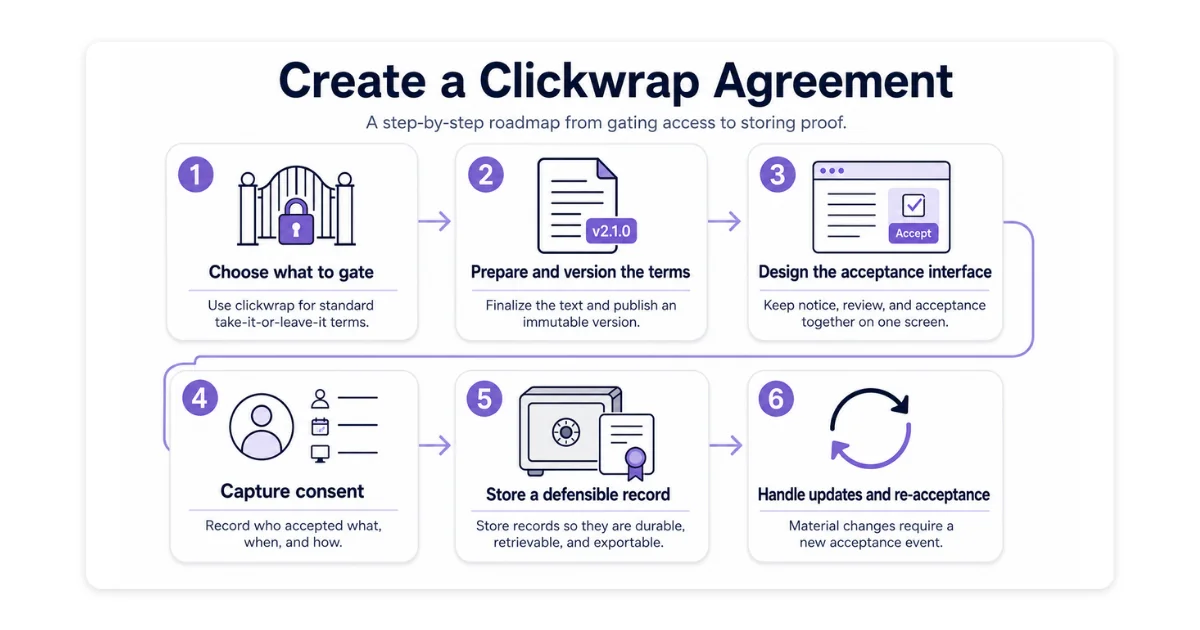
The steps below walk through the full task, from choosing what to gate to storing a record that survives a dispute.
What a Clickwrap Agreement Needs to Hold Up
Before you build anything, you need to know what a court actually examines. Electronic acceptance is valid under the ESIGN Act and UETA in the United States and under eIDAS in the EU, but legal validity is not the same as a record that wins an argument.
Courts judge the mechanics of the specific flow, not the label on it (electronic signature or clickwrap). Those mechanics come down to four conditions, drawn from how courts have ruled on real clickwrap enforceability disputes:
- Conspicuous notice - The terms are presented where the user cannot reasonably miss them, not relegated to a footer link in the manner of browsewrap.
- Affirmative action - The user takes a deliberate, separate step to accept, rather than being opted in by default.
- Opportunity to review - The full agreement text is available before acceptance.
- A record tied to the version and the user - You can show which specific terms a specific user accepted.
Each one comes down to a choice you make while building.
Decide Which Agreements Go Behind a Click
Not every document belongs in a clickwrap flow. Clickwrap works for contracts of adhesion, terms offered on a take-it-or-leave-it basis where the user's only choices are accept or walk away.
Standard terms of service, a privacy policy, a routine data processing agreement, and standardized commercial terms all fit. A negotiated contract does not, because clickwrap captures assent to fixed text and has nowhere to record the back-and-forth that defines a negotiated deal.
How you bundle those agreements matters. Wrapping several documents behind a single "I agree" is convenient, but it weakens the record for any one of them, and courts have been more skeptical of bundled consent when a high-stakes clause, such as an arbitration provision, is buried among routine terms. Separate, granular acceptance is harder to challenge, so reserve a dedicated click for anything you would need to enforce on its own.
Placement carries the same weight as wording. A privacy policy is typically accepted at registration, terms of service at the point a user reaches the gated feature, and a data processing agreement by someone with authority to bind the organization, not whichever end user happens to be logged in. Tie each document to the moment access depends on it, and to a person whose acceptance actually counts.
Prepare and Version the Terms Before You Show Them
A clickwrap captures assent to whatever text is on the screen, so the wording has to be final before a single user sees it. Anything unfinished becomes part of a binding agreement the moment someone clicks. Settle the drafting first:
- Resolve every placeholder - No brackets, no template variables left unfilled in the text a user will actually accept.
- Get legal sign-off - Every clause is reviewed and approved, not pending.
- Confirm the scope - The terms cover the specific product or feature this clickwrap gates, with no leftover language from another agreement.
- Lock the supporting documents - Anything the terms reference, a privacy policy, a DPA, a fee schedule, is itself final, since a reference to a moving document is a hole in the agreement.
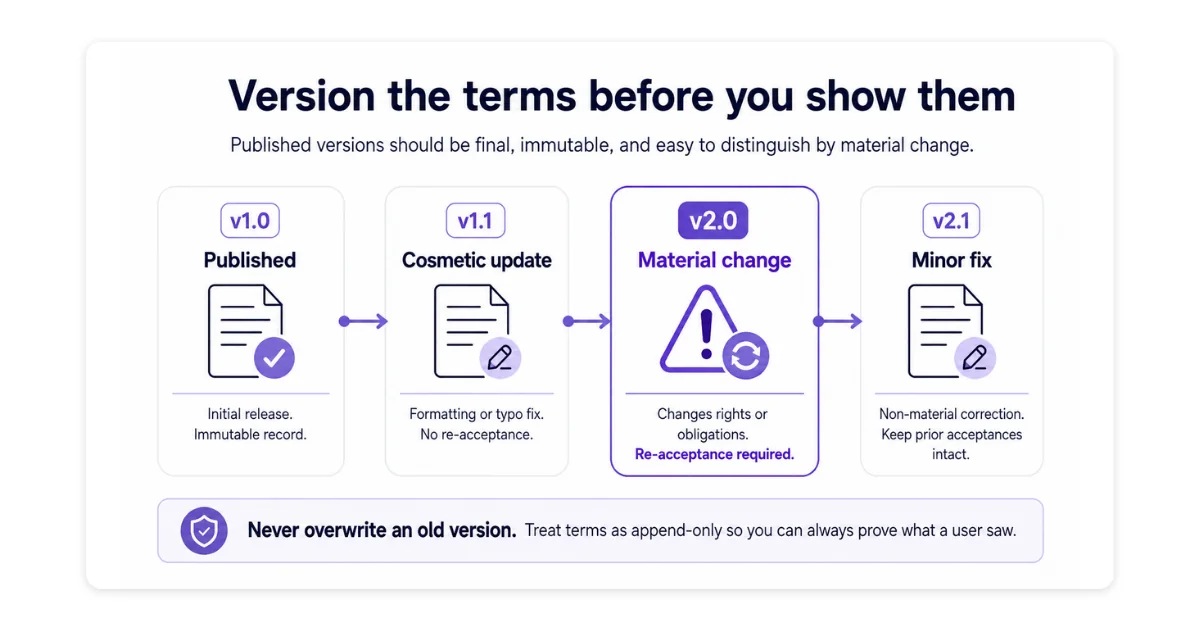
Once the wording is settled, assign it a version. A published version has to be immutable as editing it in place destroys your own evidence, because you can no longer prove what any past user actually saw. Treat versions as append-only, where a correction creates a new version and never overwrites the old one.
Use a scheme that separates material change from cosmetics. A material change shifts the rights or obligations of either side, a new liability cap, a different governing law, an added arbitration clause. Major and minor version numbers encode that split cleanly, and the distinction earns its keep once terms start changing. Build it in from the first version rather than retrofitting it later.
Design the Acceptance Interface
The interface is the screen where the terms are shown and accepted. Most of the work is putting three things in one view, the notice of the terms, the path to read them, and the control that accepts them, with nothing competing for attention. Kept together on one screen, the design forecloses any later claim that the user did not know what they were agreeing to.
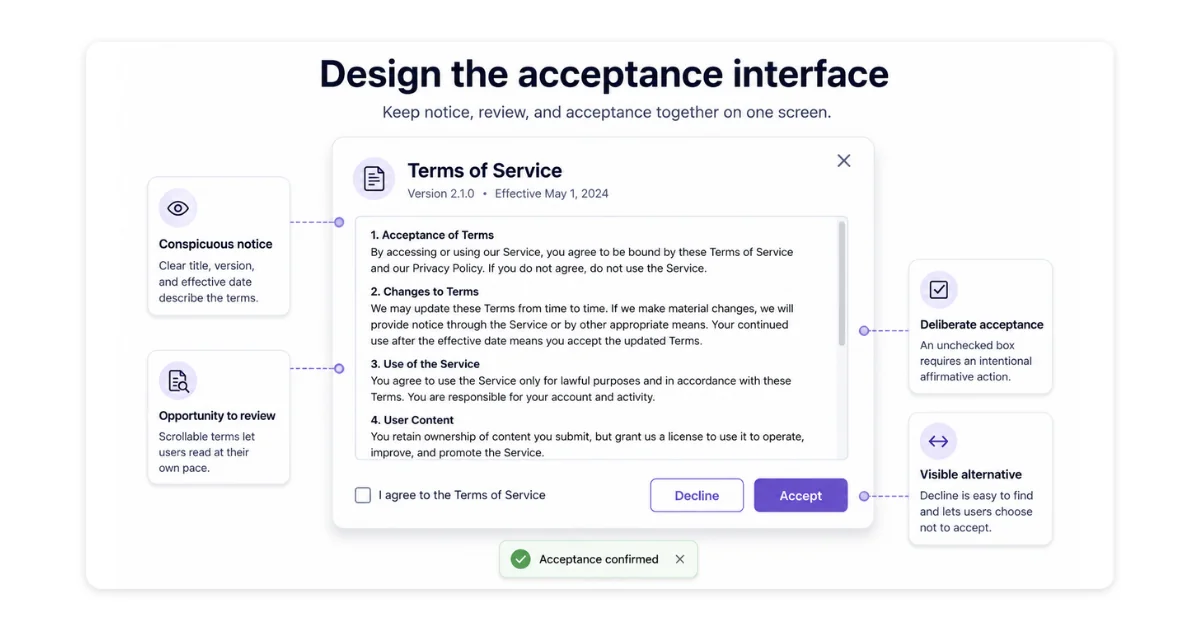
- Present the terms with the control - Show the full text in a scrollable panel, or open it from a link that reads plainly as one, on the same screen as the accept action.
- Name the agreement up front - A heading states which agreement the screen is asking the user to accept, before they engage with it.
- Make acceptance a deliberate, named act - One prominent control the user actively operates, an unchecked box they tick or a button they click, labeled with the agreement it accepts rather than a generic next step.
- Offer a real alternative - A visible way to decline or go back, distinct from the accept control, so accepting reads as a choice rather than the only way forward.
- Confirm the result - Acceptance returns a clear confirmation the user can see, so neither side is left guessing whether it went through.
- Keep the screen uncluttered - Nothing competes with the terms and the control for attention, so the path through the screen is unambiguous.
- Works on every screen - The terms, the control, and their proximity survive a narrow viewport, since mobile layouts are where conspicuous notice most often quietly breaks.
Capture Consent Correctly
The interface can be flawless, but if the moment of acceptance is not recorded properly, there is nothing to fall back on when the agreement is challenged.
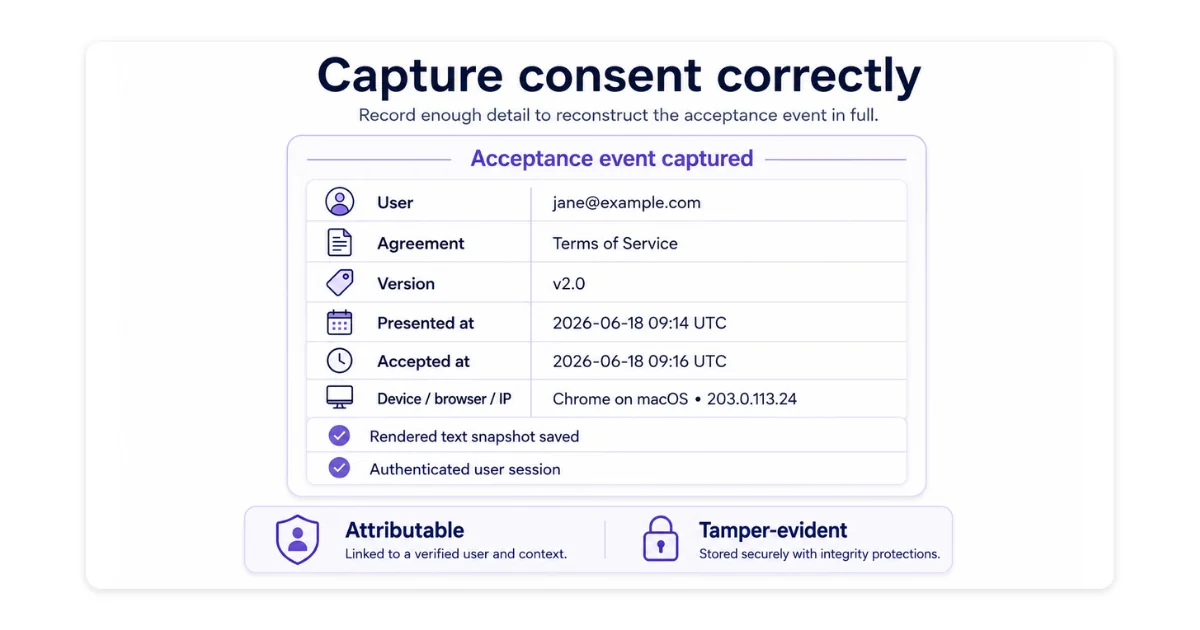
When the user accepts, capture enough information to reconstruct the acceptance event in full, which comes down to five points:
- Who accepted - A user identifier, strengthened with identifying details such as name and email, so the acceptance attaches to a specific person rather than an account number.
- What they accepted - The template identifier, the version number, and the full rendered text of the terms as shown.
- When they accepted - A timestamp recorded in UTC.
- How they accepted - Device, browser, and IP address.
- When the terms were presented - A separate timestamp for the moment the agreement was displayed.
Two properties have to hold across the whole record. It must be attributable, tied to an authenticated user rather than an anonymous session, so the acceptance points to a real person. And it must be tamper-evident, so no one, including you, can quietly alter it after the fact.
Store a Defensible Record
Once an acceptance is recorded, where and how you keep it decides whether it is still usable when you need it. The test is simple: if someone disputes an agreement two years from now, can you retrieve the record on demand and produce it without it having degraded, moved, or been quietly changed?
A defensible store has a handful of properties:
- Durable - The store is replicated and backed up, with restores actually tested, so a record survives hardware failure or a botched migration years later.
- Independent - The record persists on its own and does not break when the surrounding product changes, a template is retired, a URL moves, or a service is decommissioned.
- Retrievable - Any individual acceptance can be located and pulled out on demand, by user and by version, rather than searched for by hand.
- Exportable - The store can produce a standalone, portable copy of a record, such as a certificate, that holds up outside your systems, in front of a court or counterparty.
- Retained deliberately - Records outlive the relationship they govern, because disputes routinely surface after a user has left, so retention is a decision rather than a default.
Built on these properties, the store holds up under scrutiny instead of becoming a pile of files nobody can vouch for.
Handle Updates and Re-Acceptance
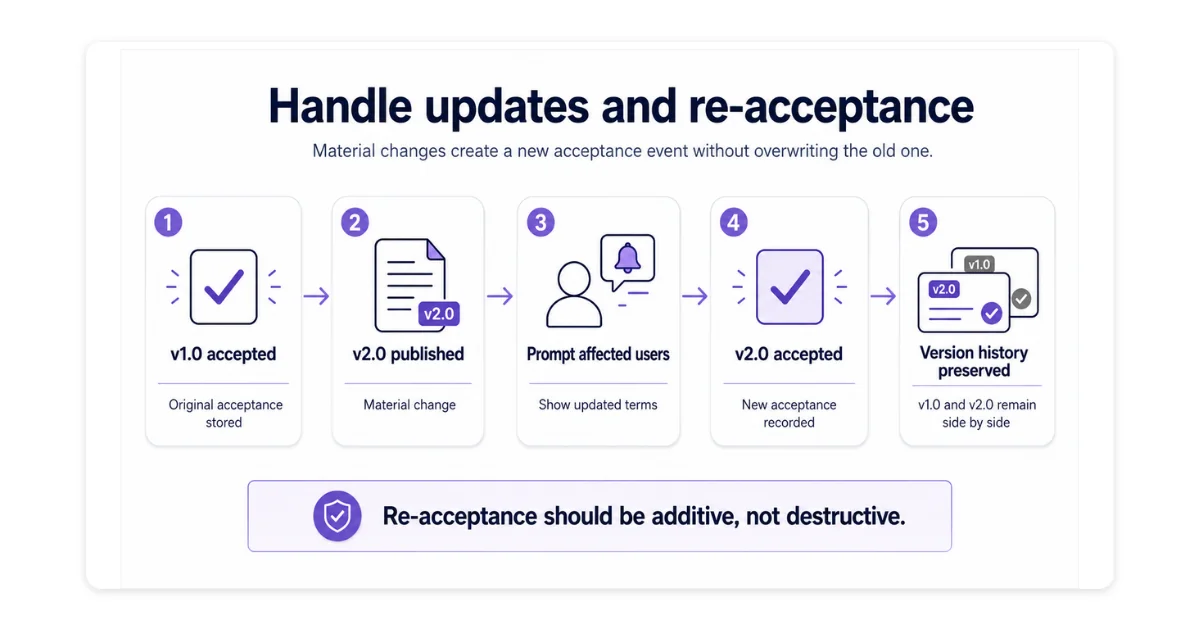
Terms change, and the record has to keep pace without leaving a gap in coverage. A material change, one that shifts either side's rights or obligations, becomes a new major version and requires affected users to accept again. Classifying the change is the whole decision: material changes trigger re-acceptance, cosmetic ones do not.
Re-acceptance has to be additive, never destructive. A prior acceptance stays valid for the version it covered as the user remains bound by the terms in force when they accept, so there is no retroactive gap in the window before they accept the new version. The new acceptance is recorded as a fresh entry against the new version, alongside the old one rather than overwriting it. Done this way, you can always show which version each user was bound to at any point in time.
Conclusion
A clickwrap is easy to build and hard to prove, and the gap between the two is decided long before anyone disputes it. The checkbox is the visible tenth. The versioned terms, the consent metadata, and the record that survives years of product change are what carry the agreement when it is questioned.
You are building a small system for producing evidence on demand, one that has to work after the user has left and the terms have changed. Build the steps above in order, and hold each one to a single test: can you show what this specific user saw and agreed to?